
Importing a text file in Excel 2007:
1. Select File -> Open -> find the text file and click Open.
2. In Text Import Wizard dialogue box:
Step 1:
Select Delimited, US- ASCII and click Next.
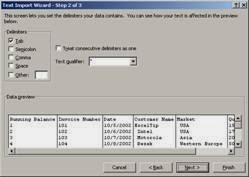
Step 3:
For each column select the Column Data Format and click Finish.
1. Select File -> Open -> find the text file and click Open.
2. In Text Import Wizard dialogue box:
Step 1:
Select Delimited, US- ASCII and click Next.

Step 3:
For each column select the Column Data Format and click Finish.

No comments:
Post a Comment
SPAMMING will not be Appreciated.